
Over the last few weeks, I’ve been experimenting with ChatGPT Work mode in my business, mainly for things like audience research, content planning and repetitive or organisational tasks, such as drafting emails, repurposing existing content, or collating information.
Like many small-business owners, I spend a surprising amount of time gathering information, sorting through ideas and trying to turn everything into a clear plan.
So, when ChatGPT Work became available, I wanted to find out whether it could genuinely help me with this. I didn’t want to automate my entire business or remove myself from the planning process, but to use it to take on some of the research and organisation that can slow everything else down.
I decided to test one connected marketing workflow using Work mode:
Research recent questions and frustrations from my target audience.
Organise them into a weekly audience-insights report.
Schedule the approved report to run each week.
Use the findings I selected to create a focused content plan.
The results from the research were very useful, but the process also showed me where ChatGPT Work mode still needs clear instructions, dependable sources and human judgement.
In this post, I’ll explain what I tested, what happened and what I would recommend if you’re considering using ChatGPT Work mode for your small business.
What is ChatGPT Work mode?
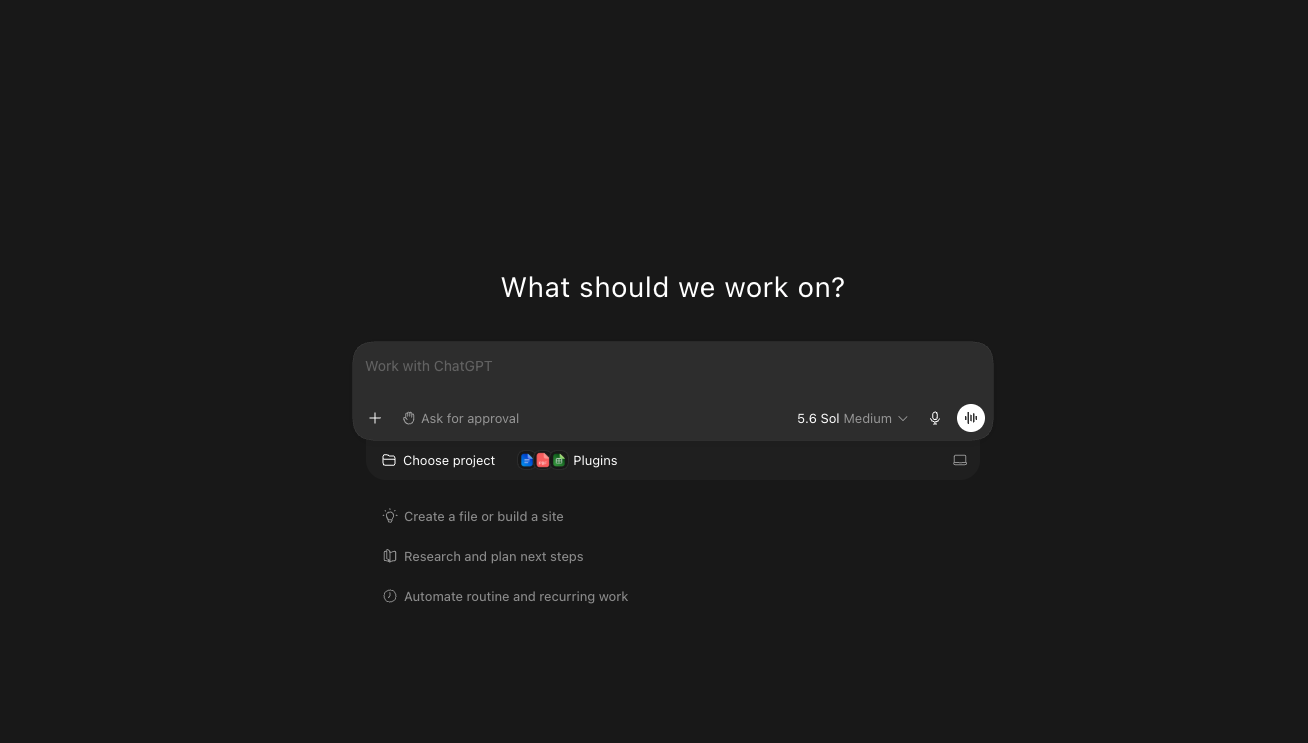
ChatGPT Work is designed for longer, multi-step tasks where you have a clearer finished outcome in mind. So for example, in Chat mode, you might ask:
“Give me ten Instagram content ideas.”
But in Work mode, you might ask:
“Review my audience research and existing content, then create a four-week Instagram content plan for my business.”
The first request produces an answer. The second involves reviewing source material, completing several connected steps and producing something you can then check and use. So basically ChatGPT can work with you across the plugins you choose to connect, such as Gmail, Canva, Trello, Notion, Google Calendar and Google Drive, the list goes on.
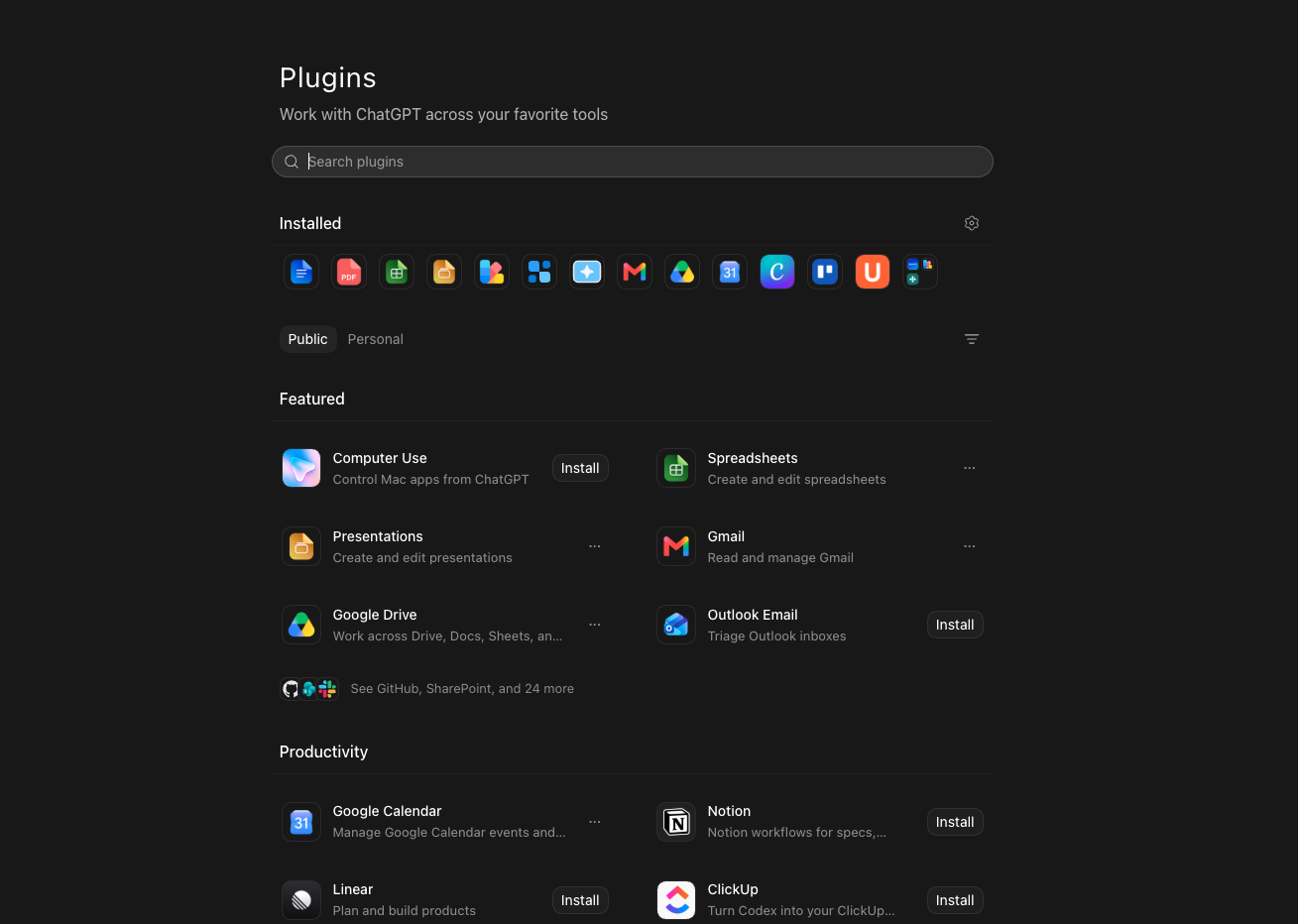
Plugins allow ChatGPT Work to use information and capabilities from selected business tools, subject to the permissions you approve.
According to OpenAI’s current explanation of ChatGPT Work, it can be used to research and analyse information and create finished documents, spreadsheets, presentations, reports and Sites. It can also support scheduled and repeatable tasks where those options are available.
Access to Work Mode can vary according to your plan, device, workspace and rollout, so it’s worth checking what you can currently access inside your own account. It also uses ‘credits’ in your account so be aware of this, as you may run out (as I did when testing!) So it’s worth checking what’s included in your account before you start playing with Work Mode.
The workflow I tested
My first test involved asking ChatGPT Work mode to create a Weekly Audience Signals and Content Opportunities Report. I wanted Work Mode to research a defined group of publicly accessible online sources from the previous seven days and identify:
Recurring audience questions and frustrations related to my own business/services
Possible misconceptions or barriers of my target audience
Topics appearing across more than one credible source
Useful words and phrases used by the audience
A small number of potential content opportunities
Gaps, uncertainties and sources it could not access
It’s important to understand here that one comment or discussion doesn’t automatically represent a wider pattern. So, if a finding appeared in only one place, I wanted the report to label it as an early signal to investigate, rather than presenting it as a proven fact about my customers. This distinction became one of the most important parts of the workflow and I was explicit with this in the prompt.
How I briefed ChatGPT Work mode
You don’t need an incredibly long or technical prompt to use Work mode. You can actually explain the task naturally, much as you would brief a colleague. However, because it may be completing a larger piece of work, I found that it helps to make six things very clear:
1. Outcome
Start by explaining exactly what you want ChatGPT Work to produce.
This might be a research report, content plan, presentation, comparison spreadsheet, marketing brief or another practical resource.
It also helps to specify the format you would like. For example, do you want the result returned in the chat, organised into a table or created as a document, presentation or spreadsheet?
Think about what you need to do with the information next. A document might be suitable for a detailed report, while a spreadsheet may be more useful for a content plan that you want to sort, update and track.
If your preferred format depends on a connected tool, you could also include a fallback. For example:
“Create the content plan as a Google Sheet if Google Sheets is available. If not, return the same information as a clearly formatted table.”
2. Context
Include the background that affects what a good result looks like. This could include what your business does, who your audience is, what you are currently promoting and the main objective behind the task.
For example, asking Work mode to “create a content plan” leaves a lot of unanswered questions. A content plan designed to build awareness will probably look different from one intended to generate enquiries or support a product launch.
You might therefore explain that you run a UK-based small business, your audience is made up of freelancers and small-business owners, and your current objective is to promote a new service or course.
You don’t necessarily need to include the full history of your business. Focus on the information that will influence the finished work and help ChatGPT understand what is relevant.
3. Sources
Tell ChatGPT which websites, documents, files or connected tools it should use. Be specific here, particularly if the task involves research or business information.
Your sources could include customer surveys, previous reports, website content, product information, a brand guide, selected industry publications or documents stored in a connected Google Drive folder.
If ChatGPT is carrying out internet research, you can also explain which types of sources it should prioritise. For example, you might ask it to use official company announcements and original research for factual claims, while using public discussions or reviews to identify possible audience questions.
You can also tell it which sources not to use. If you only want the task to be based on approved documents, make that clear so it doesn’t introduce additional information from elsewhere.
The quality of the result will often depend on the quality and relevance of the information it has been asked to use.
4. Constraints
Constraints give the task useful boundaries and prevent it from becoming too broad.
These might include the timeframe, audience, location, marketing platform, number of ideas or sources that should be avoided.
For example, you could ask ChatGPT Work to review information from the previous seven days, focus on UK small businesses and create a one-month Instagram plan containing three posts per week.
You can also add boundaries around accuracy and actions. I often include instructions such as:
Do not invent statistics, quotations or testimonials.
Do not introduce claims that aren’t supported by the approved sources.
State clearly when information or a source cannot be accessed.
Do not publish, send or share anything.
I found that narrowing the task usually produced a more focused and reviewable result. When I asked for content across several platforms and formats at once, the plan became too broad. Limiting it to one audience, platform, timeframe and objective made it much more useful. I’ll explain more about this below.
5. Quality checks
Explain what the finished work should contain and what a good result looks like.
So, for a research report, this could include source links, publication dates, recurring questions, audience language, content opportunities and a section covering gaps or limitations.
You can also explain how claims should be supported. In my audience-signals report, I didn’t want one isolated comment to be described as a wider trend. I asked Work mode to look for supporting examples across more than one source and to label findings with different confidence levels.
For a content plan, your quality requirements might include a balanced mix of educational, trust-building and promotional content. You could also ask for the audience insight behind each idea, a suggested hook, key message, call to action and any claim that still needs checking.
Examples can be useful here too. If you already have a report, article or presentation that represents the structure or tone you want, you can provide it as a reference.
6. Review point
Finally, explain where ChatGPT should stop and return the work for your approval.
This is particularly important before anything is published, sent, shared or changed in an external tool. For example, when I created a Weekly Marketing Priorities Brief using information from Gmail, I told Work mode that it could review and organise the relevant emails, but it shouldn’t send replies, archive messages or change anything in my inbox.
Similarly, I asked it to return my audience report and content plan as drafts. I could then check the evidence, decide which findings were relevant and refine the work before using it.
A review point doesn’t prevent Work mode from completing a substantial task. It simply makes it clear which decisions still belong to you.
The aim here isn’t to create a huge prompt, but you need to make the outcome, context, evidence and boundaries clear enough for ChatGPT Work to complete something useful.
In my Skillshare course, ChatGPT Work Mode for Small-Business Marketing, I walk through this framework using my complete audience-insights workflow. I also demonstrate the prompts and show how I reviewed, refined and scheduled the finished task.
What happened when I ran the report
The first result gave me a much more organised starting point than I would have had from opening several tabs and making disconnected notes. The best part for me is that it brought the findings together into one report, grouped related questions and highlighted some of the language people were using when describing their marketing challenges.
This was particularly useful because audience language can improve more than individual pieces of content. It can also help with website copy, course descriptions, emails and the way I explain my services.
However, I didn’t automatically accept every finding. I checked the following:
Whether the correct timeframe had been used
Whether I could open the sources
Whether the evidence genuinely supported the finding
Whether a theme appeared in more than one place
Whether the information was relevant to my business
Which sources or information could not be accessed
I found that some findings were useful immediately, but others needed more evidence. A few were too broad to influence my content without further research.
So, the outcome wasn’t perfect. However, it did give me a structured (and pretty impressive) research draft that made it easier for me to decide what deserved my attention. It was a great starting point and if I’d attempted to create this from scratch, it would have been DAYS of work.
I tested the workflow before scheduling it
Once I was happy with the structure of this report, I asked ChatGPT Work to schedule the same report to run every Monday morning.
BUT I only did this after running and reviewing it manually first, which is something I would strongly recommend. Because if the first result is repetitive, too broad or based on unsuitable sources, scheduling the task simply gives you an unsuitable report more efficiently! So definitely check the output before scheduling anything.
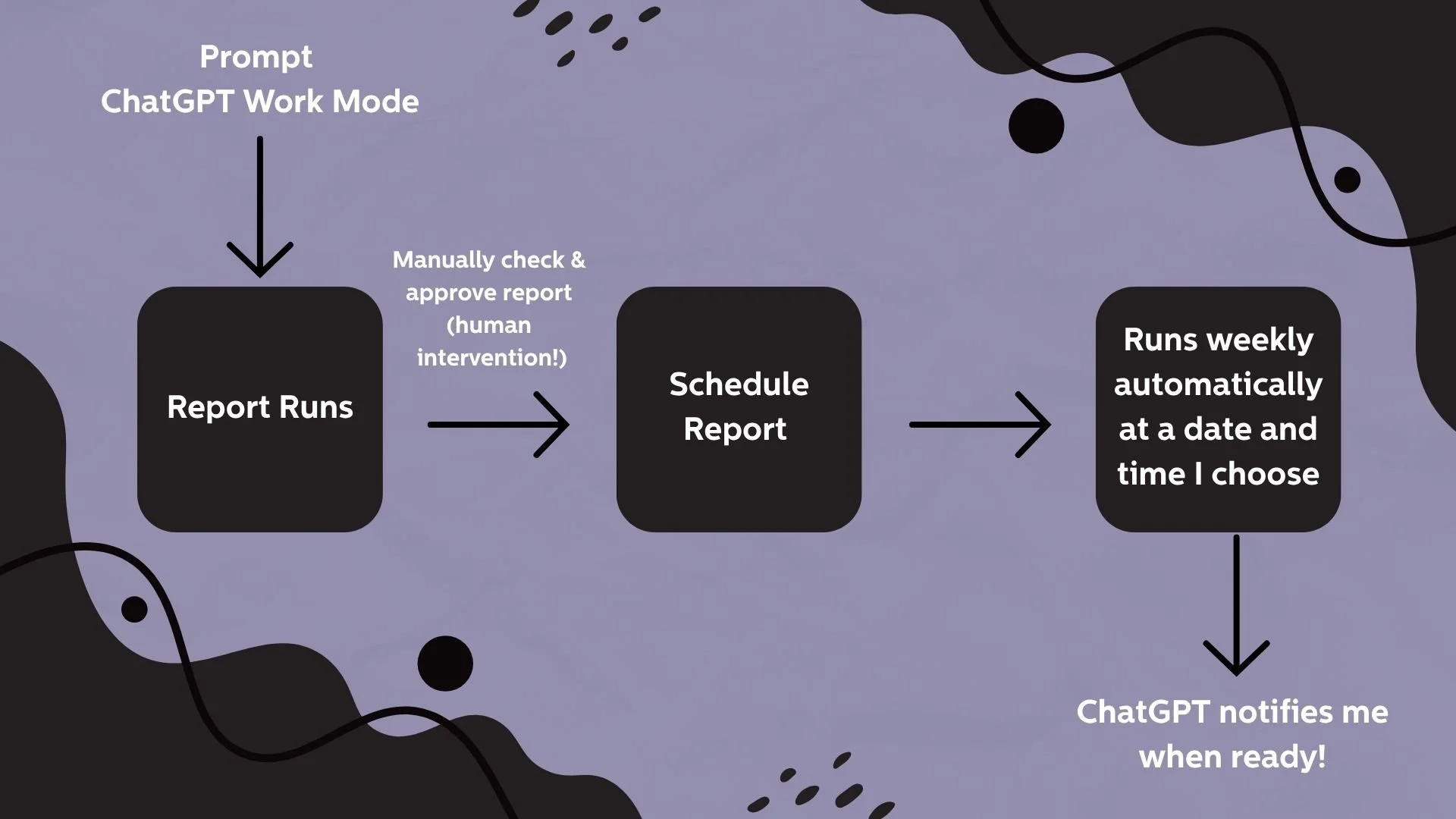
My weekly audience-report workflow includes a manual review and approval point before the task is scheduled to run automatically.
Running it manually first also allowed me to refine the sources, clarify the evidence threshold and make sure the limitations were visible.
In this scenario, I would recommend reviewing the first few scheduled reports closely, as you’ll probably need to adjust the instructions over time.
I kept content planning as a separate task
It would have been possible to ask ChatGPT Work to research the audience and immediately create a content plan from everything it found.
However, I decided not to do this because I wanted to keep a human review point between the research and the content plan.
My process therefore became:
ChatGPT Work creates the weekly audience report.
I review the findings.
I approve, reject or investigate individual signals.
At the end of the month, I start a separate content-planning task.
ChatGPT Work uses only the approved findings.
I select, adapt and rewrite the final ideas.
This also gave me another opportunity to add my current business objective. For example, was the content intended to build awareness, develop trust, generate enquiries or support a particular course or launch?
Because the same audience research could produce a very different plan depending on the answer.
The content plan improved when I narrowed the task
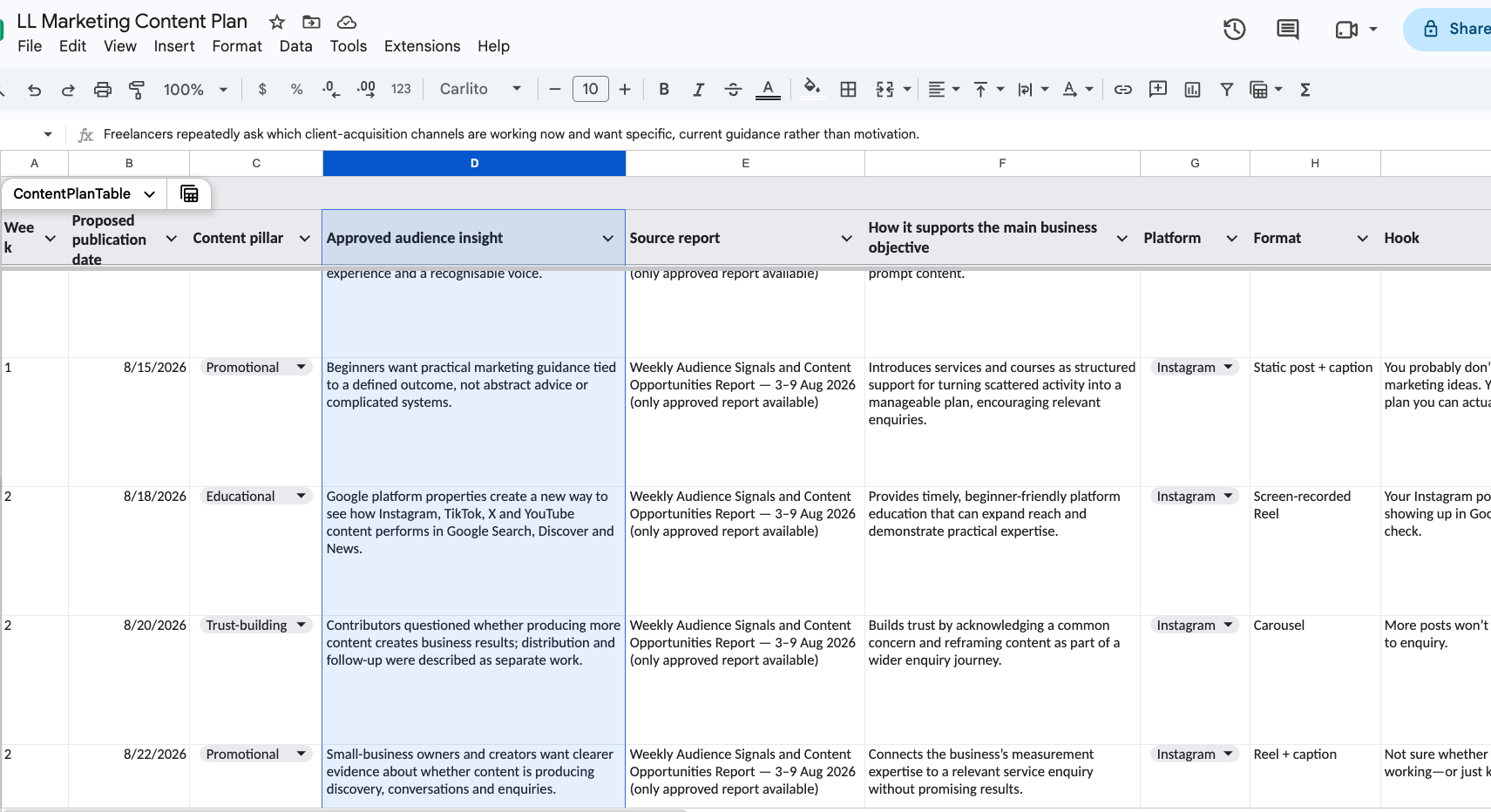
ChatGPT Work turned my approved audience insights into a structured content plan, showing the evidence and business objective behind each idea.
When I first experimented with workflows like this, I tried asking for a content plan that included several platforms and content formats at once. However, I found that the results were too broad and difficult to review properly. I personally had more success when I limited the content plan task to:
One main audience
One platform
One month
One business objective
A defined number of posts
Only the findings I had approved
I asked the finished content plan to include the audience insight behind each idea, a suggested format, hook, key message, call to action and any claim that still needed checking.
I found that this gave me something more useful than a generic list of content ideas, because I could see why each idea had been suggested and how it connected to the research. I could then keep the strongest ideas, refine others and reject anything that didn’t feel right for my audience or business.
I would still rewrite the final content in my own voice (and I would always recommend this). The benefit here was that I was no longer beginning with a blank page - I had a full content plan based on up-to-date audience research.
It’s important to note that the usefulness and reliability of the plan depend on the sources used. I would always recommend using your own data to inform the content plan where possible, such as survey results or customer-service data. However, if you don’t have this yet, for example if you are a new business, make sure you use reliable online sources only and be very specific with ChatGPT.
Be careful not to make assumptions about your audience based on one or two comments online. This exercise is more useful for content ideas that you can then test and validate, rather than a set-in-stone content plan.
What worked well
After testing ChatGPT Work mode for my small business, I found it particularly useful for:
Bringing scattered information together
Instead of reviewing every source separately, I had one report organised around questions, frustrations, emerging signals and content opportunities.
So, if you have audience research scattered across several sources, Work mode can bring this information together and create a more coherent summary of common themes, audience frustrations or possible content opportunities.
This could include survey responses, customer questions, reviews, email replies, research documents or notes you have collected over time. You would of course still need to check the findings and decide what is relevant, but having the information organised in one place can make it much easier to see the bigger picture.
Creating a consistent structure
Using the same report structure each week made the information much easier to compare and review.
Rather than receiving a completely different type of report every time, I could ask Work mode to use the same headings, evidence requirements and confidence labels. This helped me find the most important information quickly and made recurring questions or changes easier to notice over time.
A consistent structure could be useful for lots of repeated small-business tasks. For example, you might use the same format for a weekly priorities brief, customer-feedback summary, campaign report, content-performance review or monthly business update.
You can still refine the structure as you learn what is useful. However, once you have a format that works, asking Work mode to follow it each time can make the finished result more predictable and much quicker to review.
Reducing blank-page work
The content plan gave me a structured starting point, with a reason behind each idea, rather than asking me to invent another month of content from scratch.
Each suggestion was connected to an approved audience insight and my current business objective. This made the ideas feel more purposeful than a general request for social-media inspiration.
I could then review the plan, keep the strongest suggestions, change the angle of others and reject anything that didn’t feel relevant. I would still add my own experience, examples and tone of voice before creating the final content.
For me, this is one of the most helpful uses of AI. It doesn’t need to make every creative decision. Sometimes, removing the pressure of the blank page and giving you something useful to respond to is enough to make the process feel much easier.
Supporting connected workflows
The most interesting part wasn’t one individual prompt. It was the handover between research, review and planning.
The audience report became source material for the next task, but only after I had reviewed the findings. The approved insights could then feed into a content plan connected to what I wanted the business to achieve that month.
This felt more useful than completing several unrelated prompts. Each stage had a clear purpose:
Gather and organise the research.
Review the evidence.
Approve the relevant findings.
Turn those findings into a focused plan.
Add my own experience and create the final content.
This is what I mean by thinking in workflows rather than isolated prompts. Work mode can help move information from one useful stage to another, while still giving you opportunities to review, refine and change direction.
Producing practical deliverables
In another test, I asked ChatGPT Work to research competitors and benchmark my prices. It created a report and then went further by producing a spreadsheet containing my prices, internal rates and a quote calculator.
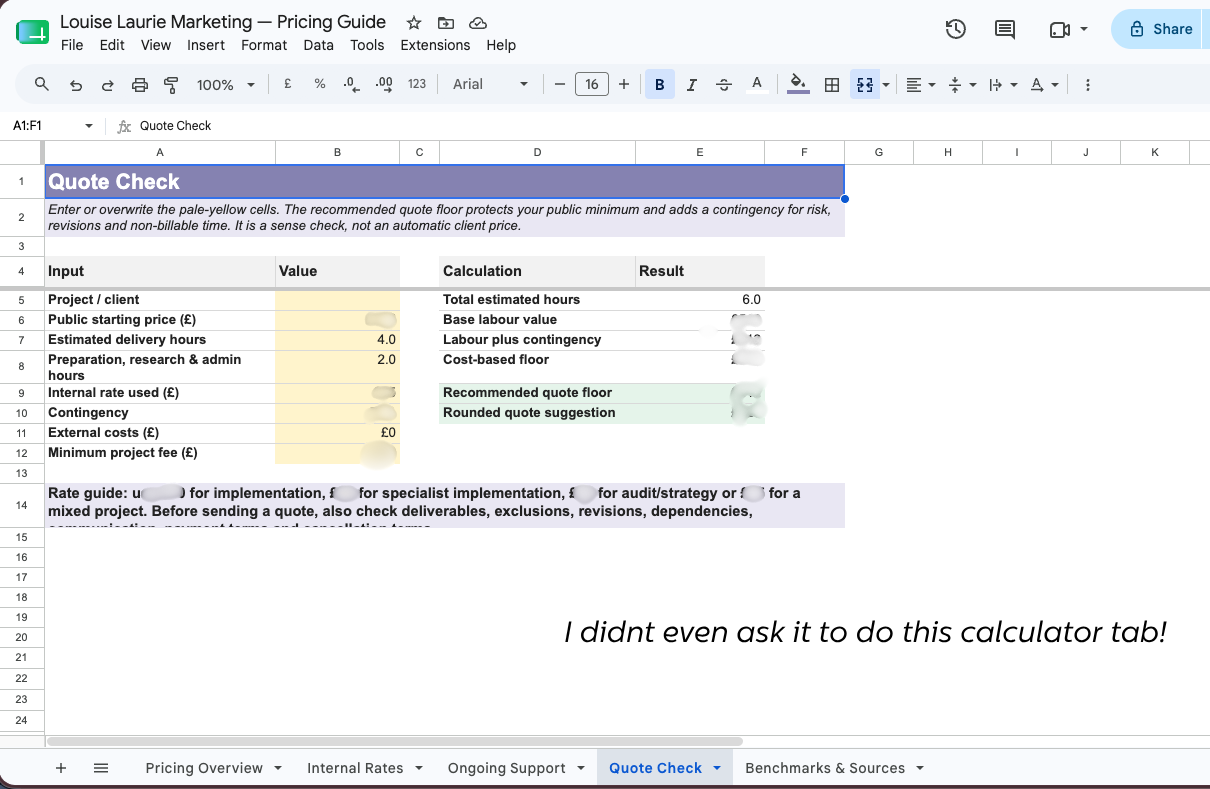
I asked ChatGPT Work to research competitors and benchmark my prices. It went further and created this quote calculator, even though I hadn’t specifically requested one.
I hadn’t initially expected the task to develop into something so practical. I thought I would receive a research report, but the finished work also gave me a tool I could use when reviewing prices and preparing quotes.
This showed me that Work mode can do more than summarise information or suggest ideas. It can turn the findings into a useful document, spreadsheet, presentation, dashboard or other practical resource.
You could potentially use this approach to create a campaign planner, customer-feedback tracker, content calendar, marketing dashboard or project brief. The important thing is to choose the format based on what you need to do with the information next.
The first result may not always be exactly what you need, and any calculations or important business information still need checking. However, asking for a practical deliverable can help turn research and ideas into something you can more easily review, update and use.
What still needed my judgement
ChatGPT Work mode didn’t remove the need for marketing experience or critical thinking.
For example, I still needed to decide:
Whether the sources were credible
Whether a pattern was genuinely meaningful
Whether the findings reflected my own customers
Which ideas supported my current priorities
Which suggestions sounded too generic
What personal experience or nuance I could add
Whether the finished content felt like me
Public internet research can suggest useful directions, but it doesn’t automatically tell you what every member of your audience believes.
As mentioned above, over time, I would strengthen the workflow by including more first-party information: customer questions, email replies, survey results, feedback and content-performance data.
I would also continue to maintain approval points before publishing, sending or sharing anything externally.
The limitations I noticed
There are several practical limitations to remember when using ChatGPT Work mode for small-business marketing.
It can’t necessarily access every source
Social platforms, personalised feeds, login requirements and website restrictions can affect what it can review.
If social-media comments or analytics are important, it may be more reliable to export the relevant information and place it in an approved file or folder.
A polished report can still be wrong
Clear formatting doesn’t guarantee accurate information. Links, names, dates, figures, quotations and claims still need checking.
Broad tasks create broad results
“Create my marketing plan” leaves too many decisions undefined. The more focused the task, audience, timeframe and desired output are, the easier the result is to review and improve.
Automation can multiply problems
A scheduled task should still be monitored. Sources change, instructions become outdated and your business priorities move on.
Sensitive information needs protecting
I wouldn’t upload passwords, confidential information or private customer data that I didn’t have permission to process.
Is ChatGPT Work mode useful for a small business?
Based on my experience so far, yes – provided you begin with a genuine business problem rather than looking for something to automate simply because the technology exists.
The best starting point is usually a focused, repeatable task that involves gathering, organising or transforming information.
Possible examples include:
A weekly customer-feedback digest
A content-performance review
A competitor or pricing report
A campaign-planning brief
A weekly marketing-priorities summary
An organised bank of notes and content ideas
A meeting-preparation or follow-up document
A monthly marketing dashboard
Begin with one useful task, run it manually, review the result and refine the instructions. Only make it recurring if it genuinely saves time or improves the way you work.
How I’m using scheduled tasks in practice
The Weekly Audience Signals Report isn’t the only task I’ve scheduled. Over the past few weeks, I’ve been experimenting with several recurring tasks to see which ones are genuinely useful in my business.
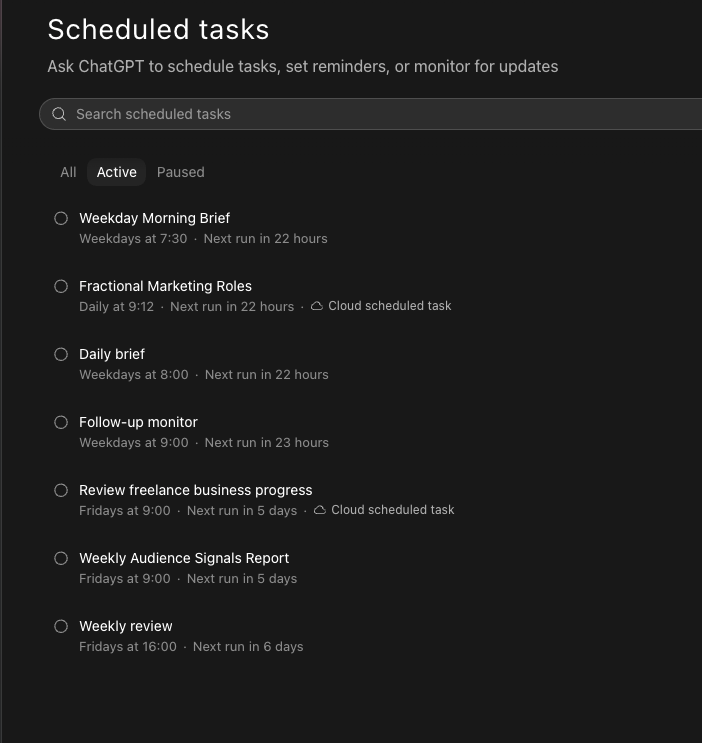
Some of the scheduled Work mode tasks I’ve been testing, including morning briefs, follow-up monitoring, business reviews and my Weekly Audience Signals Report.
For example, I’ve used Work mode to create a Weekly Priorities Brief. This reviews a defined group of emails from my Gmail and tasks from my Trello board in the previous seven days and organises them into urgent actions, replies needed, upcoming deadlines, decisions and three suggested priorities for the week.
I’ve kept a clear boundary around the task: it can review and organise the information, but it shouldn’t send replies, archive messages or change anything in Gmail. The finished brief is returned to me as a draft so I can decide what actually needs my attention.
I’ve also tested scheduled tasks for:
Creating weekday morning and daily briefs to bring my priorities and upcoming work into one place
Monitoring opportunities for fractional marketing roles
Reminding me about follow-ups that may need attention
Reviewing the progress of my freelance business each Friday
Completing a weekly business review
Producing my Weekly Audience Signals Report
Not every scheduled task will necessarily become a permanent part of my workflow. I’m still testing which ones save meaningful time and which create information I could manage just as easily myself.
However, this experimentation has helped me see that scheduled tasks don’t need to involve a huge or complicated automation. Sometimes, a concise morning brief, a useful reminder or a structured weekly review is enough to make the working week feel more organised.
A simple way to plan your first Work mode task
If you want to test ChatGPT Work mode in your own small business, start by answering these questions:
What recurring task currently takes up more time than it should?
What finished result would be genuinely useful?
What information should ChatGPT use?
What information should it avoid?
What would a good result need to contain?
Which claims or details will you check?
Where should ChatGPT stop and wait for your review?
Once you have the answers, use them to create a focused brief and test the task manually.
You don’t need to make the prompt perfect before you begin. Review the first output and improve the instructions as you learn what the task needs.
Frequently asked questions about ChatGPT Work mode for small business
What is the difference between ChatGPT Chat and Work mode?
Chat is useful for questions, brainstorming and shorter drafts. Work mode is intended for longer, multi-step tasks where you want ChatGPT to research, analyse information or create a more complete deliverable.
What can a small business use ChatGPT Work mode for?
Small businesses could use it for audience research, content planning, customer-feedback analysis, competitor research, reporting, campaign organisation, meeting preparation and other recurring tasks involving several sources or steps.
Can ChatGPT Work mode create documents and spreadsheets?
Yes. Depending on the task, available features and connected tools, Work can create deliverables including documents, spreadsheets, presentations, reports and Sites. It is sensible to include a fallback format in your brief in case your preferred option isn’t available.
Can ChatGPT Work mode automate marketing?
It can support recurring marketing tasks and scheduled workflows, but I wouldn’t recommend automatically publishing everything it creates. Keep clear review points before content is sent, shared or published.
Should I schedule my first Work mode prompt?
I would test the task manually first. Review the sources, structure and output, then refine the brief before scheduling it.
Want to try ChatGPT Work mode in your own business?
I’ve created a free resource containing 20 practical ChatGPT Work mode workflows for small businesses.
It includes ideas you can adapt for marketing, research, planning and organising your weekly work.
If you’d like a more detailed, step-by-step walkthrough, my ChatGPT Work Mode for Small Business Marketing course shows you how to choose a suitable task, create a clear brief and build a practical audience-research and content-planning workflow.
Inside the course, I demonstrate the workflow, share the editable prompts and provide templates and bonus resources you can use to plan and review your own Work Mode tasks.
The course is available directly from my website for £19. Explore the course
The most important lesson from my experiment was simple:
Start with the problem, not the tool.
ChatGPT Work mode was most useful when I gave it a focused piece of work, dependable information and a clear point at which my judgement took over.
It didn’t remove me from the process. It removed some of the friction around the process – and gave me more time to focus on the decisions and creative work that still needed me.
– Louise
P.S. Don’t forget to:
🔍 Download the free ChatGPT Work mode workflow guide
🎓 Take my new course, ChatGPT Work Mode for Small-Business Marketing
💌 Sign up for my newsletter for regular, practical marketing and AI tips